Why MacBook Batteries Lose Capacity and When Replacement Helps
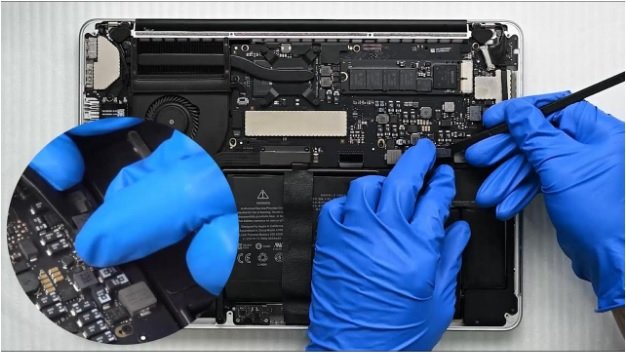
A MacBook battery gradually loses its ability to hold a full charge as it experiences regular use, charging cycles, heat, and natural chemical aging. Over time, shorter runtime, frequent charging, and unexpected shutdowns can become part of everyday use. Understanding these changes helps users recognise when battery performance has declined enough to affect productivity and portability.
When the battery becomes a major limitation, knowing when to replace MacBook battery can help restore reliable power without replacing the entire device, provided the rest of the MacBook remains suitable for your needs.
What Does Battery Capacity Mean?
Battery capacity refers to how much energy a battery can store compared with its original condition. When a MacBook is new, its battery can hold a certain amount of charge and provide power for an extended period. As the battery ages, its ability to retain that charge gradually decreases.
This decline is normal. Rechargeable batteries experience chemical aging through regular use, charging, discharging, and exposure to operating conditions. A battery that has been used extensively over a long period may therefore provide less runtime than it once did.
Reduced capacity does not necessarily mean the MacBook itself is failing. In many cases, the battery is simply reaching the later part of its useful service life.
Why MacBook Batteries Lose Capacity
Regular Charge and Discharge Cycles
Every time a battery is used and recharged, it goes through part of a charge cycle. Repeated cycles contribute to gradual battery aging.
Someone who uses a MacBook for several hours every day may notice capacity decline sooner than someone who uses the device occasionally. Frequent charging alone is not necessarily a problem, but the accumulated usage over time affects battery performance.
Chemical Aging
Battery capacity also decreases because of chemical changes inside the battery. These changes happen naturally as the battery gets older.
Even when a MacBook is treated carefully, an older battery may eventually hold less energy than it did when new. This is why battery performance should be considered in relation to the device’s age and usage history rather than based on one unusual day of short runtime.
Heat and Operating Conditions
Heat can affect battery longevity. Intensive workloads, demanding applications, poor ventilation, and warm surroundings can increase the temperature of the device.
Consistently operating under high temperatures can place additional stress on battery components. Keeping the MacBook on a suitable surface and allowing proper airflow can help maintain more stable operating conditions.
Heavy Everyday Workloads
Video editing, graphics applications, large data transfers, gaming, and other demanding activities can consume considerably more energy than light browsing or document editing.
Heavy workloads do not automatically indicate a defective battery. However, when a previously reliable MacBook begins losing charge much faster during normal tasks, the battery’s condition may deserve attention.
Signs That Battery Capacity Has Declined
Several symptoms can suggest that a MacBook battery is no longer providing the same performance.
Faster Battery Drain
If the MacBook once lasted for hours but now requires frequent charging during similar usage, reduced battery capacity may be a factor.
Unexpected Shutdowns
Sudden shutdowns can occur when a battery cannot reliably provide the power required by the system. However, charging components and internal power faults can also produce similar symptoms, so the battery should not automatically be blamed.
Frequent Charging
Needing to remain close to a charger throughout the day can be a practical sign that available battery capacity has decreased.
Charging Problems
A MacBook that charges inconsistently, refuses to charge, or behaves unusually when connected to power may have a battery problem, but these symptoms can also involve the charging system or another internal component. Repair professionals should identify the actual cause before replacing parts. The repair service described on the provided page specifically checks battery and internal power issues together.
When Is Battery Replacement Worth Considering?
Battery replacement becomes more practical when reduced capacity is consistently affecting normal use.
For example, if a MacBook shuts down unexpectedly, drains rapidly despite ordinary workloads, or cannot maintain useful runtime away from a charger, installing a suitable replacement battery can restore practical portability.
The age and condition of the MacBook also matter. If the computer continues to meet your performance needs and the main problem is declining battery life, replacing the battery may extend the useful life of the device without requiring a complete computer upgrade.
However, replacement should follow proper assessment. A battery symptom can sometimes be caused by another component, and replacing the battery alone may not solve the underlying issue.
Why Diagnosis Matters Before Replacement
Battery-related symptoms can overlap with other hardware problems. Charging faults, internal power issues, software problems, or component failures can sometimes produce similar behaviour.
A proper diagnostic process helps distinguish between these possibilities. The provided repair service states that MacBooks are evaluated before repair work begins and that battery health and internal power flow are considered when dealing with battery and charging problems.
This approach can prevent unnecessary part replacement and helps ensure that the repair addresses the actual cause of the problem.
How Professional Battery Service Helps
Battery replacement involves working with internal components and should be handled carefully. Professional service can help identify the correct battery, assess related charging concerns, install the replacement properly, and test the device afterward.
When comparing the best MacBook repair Dubai options, consider more than advertised pricing. Look for clear diagnostics, model-specific support, quality replacement components, transparent estimates, testing after repair, and an appropriate service warranty. The provided repair service lists diagnostics, quality parts, pickup and delivery across Dubai, and warranty support among its service features.
Conclusion
Battery capacity naturally declines through chemical aging, repeated use, operating conditions, and everyday workloads. Faster drain, frequent charging, and unexpected shutdowns can indicate that the battery is nearing the end of its useful life, although similar symptoms can have other causes. Proper diagnosis helps determine whether you should replace MacBook battery or address another power-related problem.
For convenient MacBook support in Dubai, 800Fixing offers battery replacement, diagnostics, quality parts, pickup and delivery, testing, and warranty support. Their technicians service MacBook Air and MacBook Pro models while assessing battery and charging concerns before recommending suitable repairs. With professional assistance and convenient doorstep support, the service helps users address common MacBook battery issues efficiently while maintaining a focus on quality, transparency, reliability, and customer convenience.